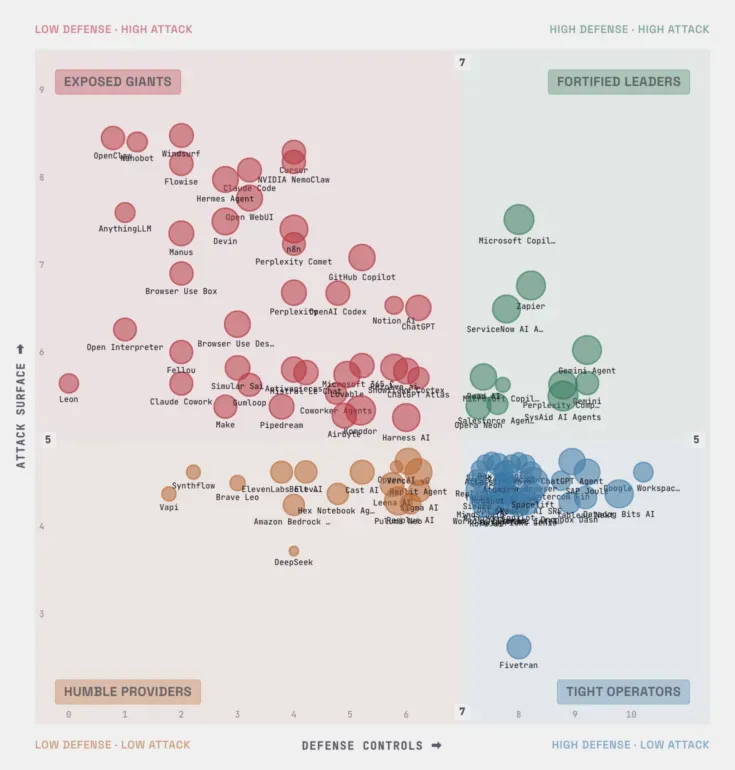
Cursor is safe for professional software engineering work when you switch on the controls it leaves off and put the hard boundaries outside the agent. With Privacy Mode on, Cursor says customer data is not used for training, and it holds zero data retention agreements with all its model providers. The agent is a different question. Workspace Trust, the control Cursor names for malicious repositories, is off by default, and Cursor’s documentation calls its run modes “best-effort guardrails rather than a hard security boundary”.
TL;DR
“Is Cursor safe?” has two answers. On data, Privacy Mode is a documented yes: no training on customer data and zero data retention with model providers, on by default for teams. On what the agent can do to a laptop, Cursor’s docs call the run modes, Auto-review, the command allowlist and .cursorignore best effort or “not a security boundary”.
Defaults moved toward autonomy in 2026. An LLM classifier became the recommended way to approve commands in May, and since October the agent can read files outside the workspace without asking. Workspace Trust is still off.
The compromises that hurt Cursor users came through the supply chain around the editor: fake and hijacked extensions, npm packages that rewrite Cursor itself, a worm that planted MCP servers, folder open lures and, in October 2026, Cursor’s own marketplace. Most of Cursor’s 33 published advisories are bypasses of guardrails those attacks never needed.
Hard enforcement lives in MDM and mostly in Enterprise plans, and parts of it fail open: hooks by default, and on Linux a missing or malformed policy file.
What to do: change the defaults this week and lock them with team policy. Then add controls the agent can’t reach: no over-permissioned credentials on the machine, egress denied by default, agent config reviewed as code, disposable environments for unknown code, and a record of every action every agent takes.
Cursor AI data privacy and the controls Cursor gets right
Privacy Mode decides what happens to your code. With it on, Cursor states that customer data “will not be used for training” and that it maintains zero data retention agreements with all providers. The one exception is abuse detection: prompts that trigger it may be stored for investigation. With Privacy Mode off, Cursor may store and use codebase data, prompts and code snippets to improve its features and train its models. Privacy Mode is on by default for team members, and Teams and Enterprise admins can enforce it so nobody can switch it off. The default for individual plans isn’t documented. In May 2025, Cursor put the share of its users with Privacy Mode on at about half.
Requests made with your own API key “still go through our backend”, where Cursor builds the final prompt, and zero data retention doesn’t cover them; your provider’s policy does. File contents are also cached on Cursor’s servers for a while, encrypted with keys the client generates. The security page lists a SOC 2 Type II attestation plus ISO/IEC 27001
, ISO/IEC 42001
and AIUC-1 certifications. Those describe how Cursor runs its own operations. They say nothing about what the agent does on a developer’s machine.
On the agent side, commands can run in an OS level sandbox: Seatbelt on macOS since version 2.0, Landlock and seccomp on Linux. Dotfile protection became mandatory in February 2026, and since version 1.3 any change to an MCP config needs fresh approval. Hooks give a deterministic allow, deny or ask on shell commands, MCP calls, file reads and prompts. MDM policies can force Workspace Trust, allowlist extensions, hold new extension versions back for a set number of hours and log out any account outside your team. Cloud Agents run each agent in its own Firecracker microVM. And when a bug is clear cut, Cursor patches fast: the CurXecute fix was merged a day after the report.
Switch all of it on. Nothing here governs what an installed extension does, though, and Cursor itself calls much of the agent tooling best effort.
Cursor’s defaults moved toward autonomy in 2026
Cursor spent 2026 asking developers fewer questions. Each step is defensible on its own, since approval prompts that people click through protect nobody. Together they move the decision from a human to a model, and from the laptop to Cursor’s servers.
In May, version 3.5 deprecated “Ask Every Time”, the mode that asked before every command, and version 3.6 shipped Auto-review as the recommended default. Under Auto-review, allowlisted calls run, other shell commands run in the sandbox, and the rest go to an LLM classifier: today Gemini 3.5 Flash Lite, with Claude Haiku as the fallback, running on Cursor’s backend. One heading on the run modes page reads “Auto-review is not a security boundary”. The classifier can allow a call you would have blocked, and when it blocks one, “Cursor can try another approach”. Put a probabilistic gate in front of an agent whose job is to finish the task, and the agent will search for a way around the gate.
In October, Cursor 3.23 added a Read Access setting. Its default, System, lets the agent read files outside the workspace without approval. The stricter Workspace option exists, but you have to choose it, and on any machine that holds credentials we would.
Workspace Trust has stayed off by default from September 2025 to November 2026. Turning it on has a cost: Cursor’s documentation says restricted mode “breaks AI features”, and Cursor advises reserving it for code you don’t trust. Cloud Agents go furthest. There the agent “auto-runs all terminal commands” and has internet access by default. An allowlist mode exists, but only Enterprise admins can lock it.
Cursor’s pages don’t even agree on what you get. The agent security page still says “By default, terminal commands need your approval.” Whether 3.6 moved existing installs to Auto-review is undocumented. So check the approval settings on each machine, then pin the mode with team policy, which takes precedence over individual and project configuration.
6 Cursor risks the built-in settings don’t close
Cursor’s documentation states most of these limits itself, and the advisory record fills in the rest: 33 published advisories through July 2026.
1. The supply chain into the editor is the proven attack path
The confirmed compromises of Cursor users didn’t need a guardrail bypass. A fake Solidity extension cost one developer about $500,000 in 2025. npm packages sold as a cheap Cursor API stole Cursor credentials and overwrote Cursor’s code on macOS. The SANDWORM_MODE worm planted rogue MCP servers in the configs of Cursor and three other assistants, so the assistant itself read the files and sent them out. And on October 29, 2026, Cursor’s own extension marketplace served a trojanized build of the Claude Code extension for about 11 hours, with an SSH backdoor and persistence that uninstalling the extension may not remove.
Extensions run with the editor’s full permissions, and no run mode, allowlist or sandbox governs them. An allowlist of extension IDs would have let October’s build through, because the ID was correct. An install cooldown of a day would have held it back. The full incident record is in our top 10 attacks on Cursor.
2. Opening a repository can run code
With Workspace Trust off, a .vscode/tasks.json task set to runOn: "folderOpen" runs the moment the folder opens, with no prompt. Cursor’s answer to the researchers was that users can turn Workspace Trust on. Attackers already use the trick: one North Korean group that ran folder open lures had infected 2,726 developer systems, according to Expel. On Windows, Cursor 3.2.16 runs a git.exe placed in the workspace root at startup and on a timer. That flaw, CVE-2026-63093, has no known fix, and Cursor treats it as out of scope.
Repository files also feed the agent’s settings. The IDE merges a project permissions.json with the user’s, and a project sandbox.json takes priority over the user file. Only team policy sits above both. Project hooks require a trusted workspace, which is a thin gate while trust is off by default.
3. The guardrails are speed bumps, by Cursor’s own account
Cursor’s LLM safety documentation calls the command allowlist “best-effort, not a security boundary” and warns that “determined agents or prompt injection might bypass it”. It says .cursorignore “is not a security boundary” either, and calls rules “suggestions, not guarantees”.
By our count, protected file lists have been bypassed at least 11 ways and command allowlists at least six. Cursor retired its denylist in July 2025 after Base64, subshells, script files and quoting all walked past it. Allowlists failed in other ways. Trail of Bits turned allowlisted commands into code execution through their own arguments: go test -exec, find -exec, fd -x. NVIDIA’s AI red team had an auto-run agent review a malicious pull request, run pip install -r requirements.txt and open a reverse shell. Every command on that path looked routine.
Protected files fail one spelling at a time: a file created instead of edited, a letter case variant, a Windows backslash or an NTFS short name, then files that other tools execute, such as .git hooks and Claude Code’s hook settings. Each bypass got a patch that extended the list. The researcher behind IDEsaster considers the class impossible to prevent entirely in the short term.
The sandbox is the closest thing Cursor has to a hard boundary, and it has been escaped at least eight ways. Most escapes share one mechanism: the agent writes a file it’s allowed to write, and a component outside the sandbox executes it later. Git ran a planted hook or an fsmonitor setting, the Python extension ran a tampered virtual environment, Docker launched a privileged container through its socket, and Claude Code’s hooks fired from a workspace file. In DuneSlide, the agent set its own working directory and wrote over the sandbox helper. Other research concluded that an agent that writes the future inputs of other systems was never sandboxed.
Coverage is partial, too. Cursor’s February write-up put the sandboxed share of requests at about a third. Windows has no native sandbox and relies on WSL2, and Cursor staff point to the missing filesystem sandbox in Windows drive wipe reports. Linux without kernel 6.2 and Landlock v3 falls back to approval prompts. MCP servers, once approved, run with the user’s privileges.
5. The blast radius is whatever the agent can reach
No setting changes what a credential can do once the agent holds it. In April 2026, a Cursor agent at PocketOS found a Railway token in an unrelated file, one created for managing custom domains that could also delete volumes, and wiped the production database in nine seconds. The backups sat on the same volume. No attacker was involved.
Local damage needs even less. Users have reported Cursor agents in auto-run modes deleting most of a Windows drive with a badly quoted rmdir /s /q. In one July 2026 thread, Cursor staff recommended Ask Every Time or an allowlist, plus backups on another drive, then added: “I won’t claim confirmation mode fully removes the risk.” With System read access, the default, the agent can also read files outside the workspace, such as ~/.ssh and ~/.aws, without approval, and .cursorignore does nothing for terminal or MCP tools.
6. Central enforcement is mostly Enterprise, and parts of it fail open
The controls a security team can push and lock sit mostly in Enterprise plans. Run Mode policies, .cursor directory protection, browser origin limits, the MCP server allowlist and the lock on Cloud Agent network policy are all documented for Enterprise teams. Teams customers can enforce Privacy Mode. Below that, each developer’s settings are the policy.
Where enforcement exists, parts of it fail open. A hook that crashes or times out lets the action through unless it sets failClosed: true, and false is the default. On Linux, the MDM policy is ~/.cursor/policy.json, a file in the user’s home directory, and if it is missing or holds invalid JSON, Cursor “runs without policy restrictions”. Elastic found that a developer signed in with a personal Cursor account escapes enterprise hooks entirely, which is why the AllowedTeamId policy matters.
And the policy binds Cursor only. Most estates run several coding agents, and the same limit applies to Claude Code: each vendor’s settings govern its own agent on its own surfaces.
So the settings work best on a managed Enterprise fleet with Workspace Trust on, a short allowlist and someone reviewing policy. Personal logins, admin laptops, Windows machines without WSL2 and teams below Enterprise get much less. And the attacks that caused confirmed harm went around the agent’s guardrails, not through them.
Cursor security best practices: settings first, then controls that hold without them
Cursor enterprise security works in two layers: the settings Cursor enforces, and the controls outside Cursor that hold when those settings fail. Settings and labels below are as of Cursor 3.x in November 2026. Cursor renames them often, so verify each one in the product before rollout.
Settings to change this week
| Setting | Change it to | Who can lock it |
|---|
Workspace Trust (security.workspace.trust.enabled) | On, with task.allowAutomaticTasks set to "off" | MDM policy WorkspaceTrustEnabled |
| Run mode | Allowlist with an empty list for unfamiliar code; Auto-review with the sandbox for daily work; Run Everything only in a disposable environment | Team Run Mode policy (Enterprise) |
| Sandbox network | “sandbox.json Only” | Team policy |
| Read Access (3.23 and later) | Workspace | Team read policy (Enterprise) |
| File-Deletion, External-File and Browser protections | On | .cursor directory protection is Enterprise only |
| Privacy Mode | Enforced across the organization, personal API keys blocked | Teams and Enterprise admins |
| Extensions and plugins | Allowlist by ID, install cooldown of at least a day, public plugin marketplace disabled | MDM AllowedExtensions, admin dashboard |
| MCP servers | Admin allowlist of servers and tools, with every mcp.json change reviewed | MCP allowlist (Enterprise) |
| Hooks | Deployed through the MDM system paths with failClosed: true | MDM |
| Accounts | SSO, with only your team ID allowed to sign in | MDM AllowedTeamId |
| Cloud Agents | “Allowlist only” network access | Lock Network Access Policy (Enterprise) |
| Updates | Current, with fleet versions monitored | MDM UpdateMode |
Keep Claude 4.5 Haiku allowed in model controls, because blocking it can switch Auto-review off. On Linux, validate the policy JSON in CI and watch the file, since a broken or deleted policy means no policy. On Windows, run the agent inside WSL2 so the sandbox applies, and treat a git.exe in a repository root as a red flag. Cursor’s hardening guide has the full admin list.
Controls that hold if every setting fails
Settings decide what Cursor allows. A security review has to ask what the environment still guarantees when a setting is wrong, missing or bypassed. Four of the controls below shrink what the agent can reach, and one watches what it does with the rest.
-
The agent holds no credential that can do lasting damage. PocketOS took nine seconds because a token for domain settings could delete volumes and the backups lived next to the data. Inject secrets at launch from a vault, prefer short lived or OIDC credentials, give the agent its own identity where the tooling allows, and keep backups out of reach of any token on a developer machine. Then check: can any credential the agent can read destroy both the data and its backups?
-
Egress is denied by default. Cursor’s default sandbox network opens package registries and code hosts such as github.com and npmjs.com, and any of them that accepts uploads doubles as a way out. Mermaid diagrams, JSON schema fetches and a browser opened with a secret in its URL have all carried data out of Cursor with no click from the user. Send agent traffic through a proxy that denies by default, control DNS, and alert on tunnel services such as Cloudflare Quick Tunnels and ngrok.
-
Agent config is code. .cursor/, .vscode/, .claude/, AGENTS.md, mcp.json and .git/hooks decide what runs. Give them CODEOWNERS entries, fail CI on hidden Unicode, and alert when anything other than a person writes to ~/.cursor/mcp.json or the project rules. The Miasma worm reached Cursor through one rule file set to apply to every request.
-
Someone watches what the agent actually does. Most of the bypasses above beat a check that judged a single step: a command string, a path, a dialog, a classifier’s guess. The chain gives them away. In NomShub, the agent read a README, rewrote ~/.zshenv and launched Cursor’s tunnel binary, three routine steps that together hand an attacker a shell. Watch every action, connect the steps into one chain, and block it before the last step lands. Cover every agent your developers run, because Cursor’s policy binds only Cursor, and keep the record off the machine. Endpoint teams have started writing rules for coding agent child processes and config writes, and their guidance includes a rule any SOC can adopt today: never close an alert just because a trusted coding agent is the parent process. This is the job of a coding agent security platform. The test: if a Cursor agent read a production secret and sent it out tonight, who would know, and when?
-
Unknown code opens in a disposable room. Folder open tasks, planted binaries and poisoned rules all detonate when the project opens, before anyone reads a line. Open unfamiliar repositories in a devcontainer or microVM with no host credentials, no Docker socket, no home directory mount and a read-only .git/hooks. Trail of Bits recommends launching untrusted containers from the CLI rather than through “Reopen in Container”, which gives container code a path to the host by design. Cloud Agents already run in microVMs. Lock their network to an allowlist, keep production secrets out, and they become the right place to let an agent run without prompts.
Protect your AI coding agents
See every action your coding agents take, connect those actions into chains, and block only the dangerous ones before they complete.
Explore the platformFAQ
Is Cursor safe to use for work?
Yes, for interactive work on code you trust, with Privacy Mode enforced, Workspace Trust on, a minimal allowlist and team policy locking those settings. A repository you just cloned, a personal login, a Windows machine without WSL2 and any unattended run belong to a different risk class that those settings don’t cover.
Does Cursor send my code to its servers?
Yes. Prompts and the code context they carry go through Cursor’s backend, even with your own API key, because that’s where Cursor builds the final prompt. File contents are cached there temporarily, encrypted with keys the client generates. Auto-review’s classifier also runs on Cursor’s backend.
Does Cursor train on my code?
Not with Privacy Mode on. Cursor states that customer data is not used for training, and it holds zero data retention agreements with its model providers. With Privacy Mode off, Cursor may store and use code data to train models. Requests made with your own API key fall outside zero data retention, so your provider’s terms apply.
Does Privacy Mode protect against prompt injection?
No. Privacy Mode governs what Cursor and its providers keep. It does nothing about a malicious README, rule file, extension or MCP response steering the agent. Those need the settings and controls above.
Is Cursor safe to download?
Get it from cursor.com. The documented risk is what gets added afterward: extensions from Open VSX or Cursor’s own marketplace, and npm packages posing as Cursor tooling. If version 2.1.312 or 2.1.313 of the Claude Code extension ever ran on a machine, follow Cursor’s notice: run its remediation script, rebuild the host and rotate credentials.
Is Auto-review safe?
It cuts prompts, which helps, but Cursor’s documentation says it “is not a security boundary”. It is an LLM classifier that can wave through a call you would have blocked, and Cursor can try another approach after a block. Use it with the sandbox on and egress restricted, and never as the only control on code you don’t trust.
Is the code Cursor writes safe?
Treat it like code from a fast new contributor: review it and scan it in CI. In Veracode’s 2025 benchmark, AI generated code failed security tests in 45% of tasks. Agents also add dependencies, so check every new package before it lands. Some names that models suggest don’t exist until an attacker registers them.