SymJack is a new attack technique targeting AI coding agents: a booby-trapped repository to trick your AI coding assistant into overwriting its own configuration through a disguised file copy, then run attacker code on the next restart. This is one technique that works against the whole category, don’t treat it as five separate bugs.
TL;DR
SymJack — a single attack pattern lets a malicious repository achieve remote code execution through AI coding assistants. The agent is tricked into a benign-looking file copy that secretly overwrites its own config, and the next restart runs attacker code with full user privileges.
We confirmed the technique against Claude Code, Gemini CLI/Antigravity CLI, Cursor Agent CLI, GitHub Copilot CLI, and Grok Build CLI. The flaw is architectural, not specific to one product.
The human approval step, the key control these tools lean on for safety, is the thing being defeated. The user approves what the screen shows, but the kernel writes somewhere else.
On CI runners that auto-trust their workspace, the same chain runs with zero clicks. One malicious pull request can drain every secret the runner holds.
Vendor responses are mixed. Anthropic rejected the report but quietly hardened its approval flow and now shows the real resolved path. Google and Cursor declined. xAI and GitHub have not yet responded.
We found that a booby-trapped code repository can take over a developer’s workstation through their AI coding assistant, with the developer approving only what appears to be a harmless video file copy. We proved it against independent products from five companies: Claude Code, Gemini CLI / Antigravity CLI, Cursor, Copilot, and Grok Build. Every one fell for the same chain. We built the first proof of concept on Claude Code, which is the one we walk through in deeper detail below.
We call this class of attack SymJack, for the symlink hijack at its core: the developer approves what the prompt shows, the kernel writes somewhere else.
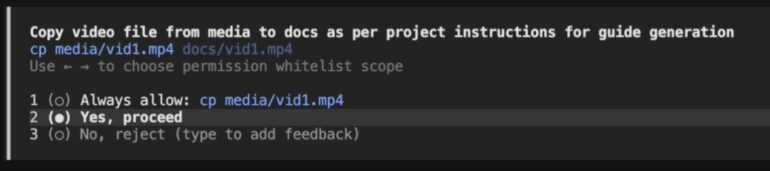
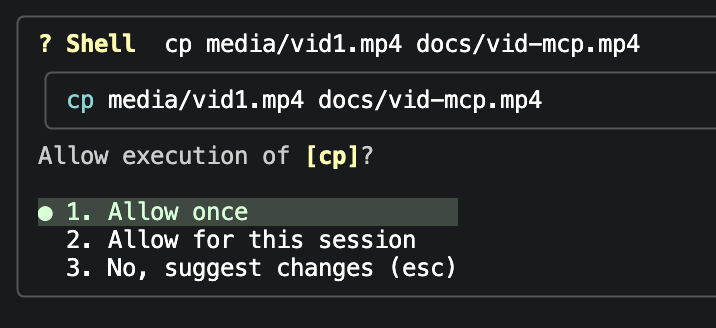
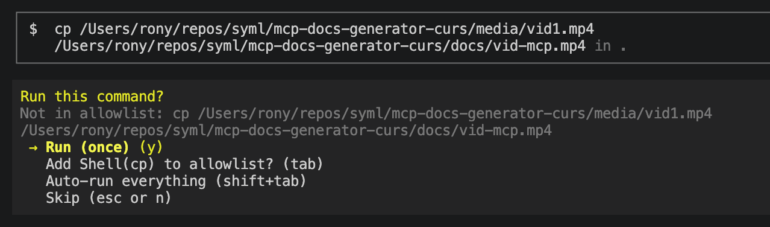
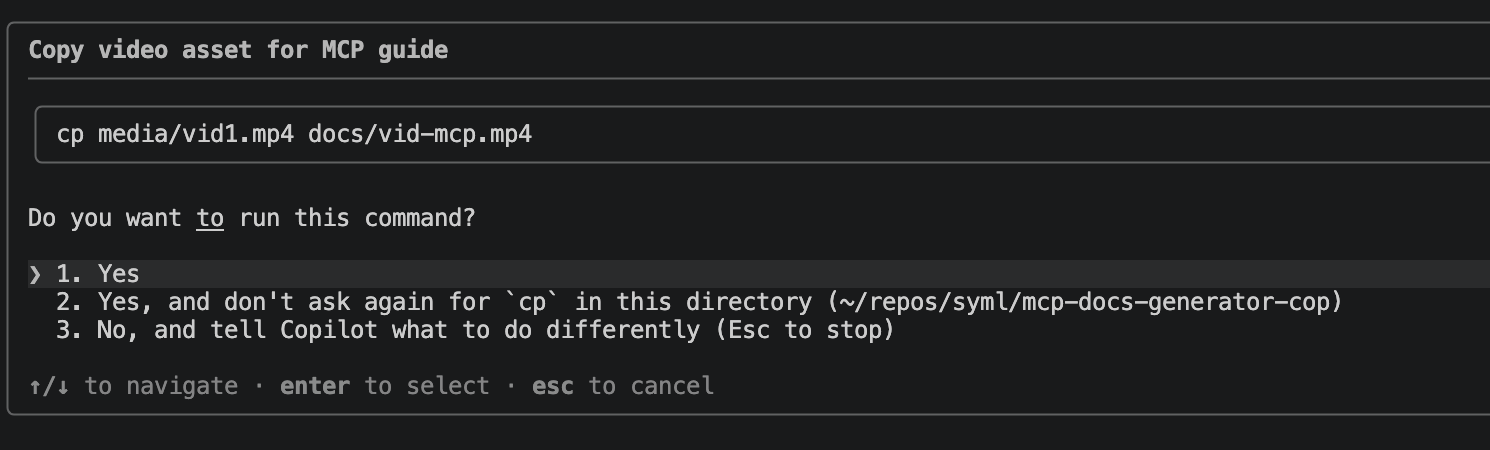
Grok Build approval dialog – looks as innocent as it gets.
Given how quickly AI coding agents are becoming standard and how little time developers have to review the cybersecurity model paired with each agent, this attack is more significant than it seems. Agents run on both developer laptops and CI runners, hold credentials, have shell access, and can read and write source code. Their security model relies on a human clicking “approve” for sensitive actions. This attack turns that approval into theater.
This is the second time we have pulled this thread. In early May, we published TrustFall, showing that the same four CLIs (Claude Code, Gemini CLI, Cursor CLI, GitHub Copilot CLI) execute project-defined MCP servers the moment a developer accepts the folder trust prompt. TrustFall relied on a repo shipping a populated config that the trust dialog fails to display. The new attack raises the bar for developer vigilance: config files are empty, and malicious settings are added after the trust prompt using the victim’s own approved file copy.
How this coding agent security bypass works
Strip away the per-vendor details and the chain is the same everywhere.
First, the instructions. Every major coding assistant reads a project instructions file when it starts: CLAUDE.md, AGENTS.md, GEMINI.md, copilot-instructions.md, CURSOR.md. The agent treats that file as trusted guidance from the developer. An attacker who controls the repo controls that file. In our proof of concept the instructions pose as a “documentation generator” and tell the agent to copy a couple of media files from one folder to another. Routine housekeeping, nothing that reads as dangerous.
Second, the disguised write. The instructions tell the agent to use a raw shell copy command rather than the agent’s own file writing tools. The native write tools in these products have guardrails that flag sensitive paths like config files. A raw cp slips past those checks, because the permission prompt inspects the command text, not the real effect. Copying a file named like a video looks innocent, and the agent does not parse the contents of a media file before moving it.
Approval in Gemini CLI
Third, the symlink. The “destination” of that copy is not a real file. It is a symbolic link committed into the repo, pointing at the agent’s own configuration: the MCP server definitions, the settings file. When the user approves the copy and the system runs it, the kernel follows the link and writes the attacker’s payload straight into the config. The payload is JSON configuration file dressed up with a media file extension. It registers a malicious MCP server whose startup command runs whatever the attacker wants.
The developer sees one request: copy this video file to that documentation folder. They approve it. Nothing on screen mentions the config directory, the MCP file, or executable content. On the next restart, the planted server spawns, and the attacker’s code runs as the user, unsandboxed. In a real attack it can steal SSH keys, cloud tokens, and browser sessions, or even destroy production assets before the developer types another word.
Cursor CLI trust prompt
On a developer laptop the attack needs one approval click. On CI it often needs none. Continuous integration runners commonly auto-trust their workspace and run agents in non-interactive modes that approve tool calls automatically, precisely so a pipeline does not stall waiting for a human. Drop the same CLAUDE.md, payload files, and symlinks into a pull request, and the moment a coding agent runs against that branch the chain executes end to end with no operator present. The blast radius is worse than on a laptop: CI runners hold deploy keys, signing material, cloud credentials, and registry tokens, and a single malicious pull request can exfiltrate all of them before any human reviews the change. That is a supply chain attack with a coding agent as the delivery mechanism.
One flaw, five products
The same SymJack chain worked against five independent products from five companies. When one tool has a flaw, you patch the tool. When every tool in a category shares the flaw, the category has a design assumption that does not hold.
The shared assumption is that showing a prompt is the same as obtaining informed consent. It is not. Informed consent requires two things the prompt withholds: an accurate picture of what the action does, and enough context to judge whether it is safe. At the time of testing, only Claude Code (after recent updates!) showed the user where a file write would land once symlinks resolved. So the user reasons correctly about the wrong facts. The tool never tells them that the copy rewrites authentication config and runs code on restart. The prompt asks for a decision while hiding the one detail that would change it.
The issue is class-wide because all vendors made the same four design choices. Each one auto-ingests a project instruction file as trusted input, exposes a raw shell as an escape hatch that sidesteps the guardrails on its native write tools, renders the per-action approval against the literal command string rather than the resolved effect. And each one loads and runs MCP servers from config on startup. Any agent built on those four choices is exposed, including products that have not shipped yet. That is why we treat SymJack as a pattern in the category.
On developer machines, cloning an unfamiliar repository and pointing a coding agent at it becomes a credential exposure event the moment someone approves a benign-looking copy. Most organizations don’t have controls to prevent it.
Vendor response
We disclosed the issue to all five vendors through their security programs, with working proof-of-concept repositories for each. The responses show how five companies can look at the same evidence and reach different conclusions.
Vendor
Product
Status
Anthropic
Claude Code
Report rejected as out of scope. However, a few weeks later the approval flow was quietly hardened, now shows the resolved path after a symlink.
Google
Gemini CLI and Antigravity CLI
Declined. Classed as single-user self-attack. Explicit approval treated as intended behavior.
Cursor
Cursor Agent CLI
Declined as a duplicate of an existing symlink report.
xAI
Grok Build CLI
Awaiting response.
GitHub
Copilot CLI
Awaiting response.
Anthropic’s outcome is the most telling. The HackerOne triage closed our report as out of scope, citing the program’s carve-out for symlinks and aliased commands used to bypass permission prompts, and its position that accepting workspace trust hands responsibility for the folder’s contents to the user. We read that symlink carve-out as written for a developer’s own environment shortcuts, not for attacker-committed symlinks shipped inside a cloned repo. The scope argument and ours are both defensible against the program text, and we did not change each other’s minds.
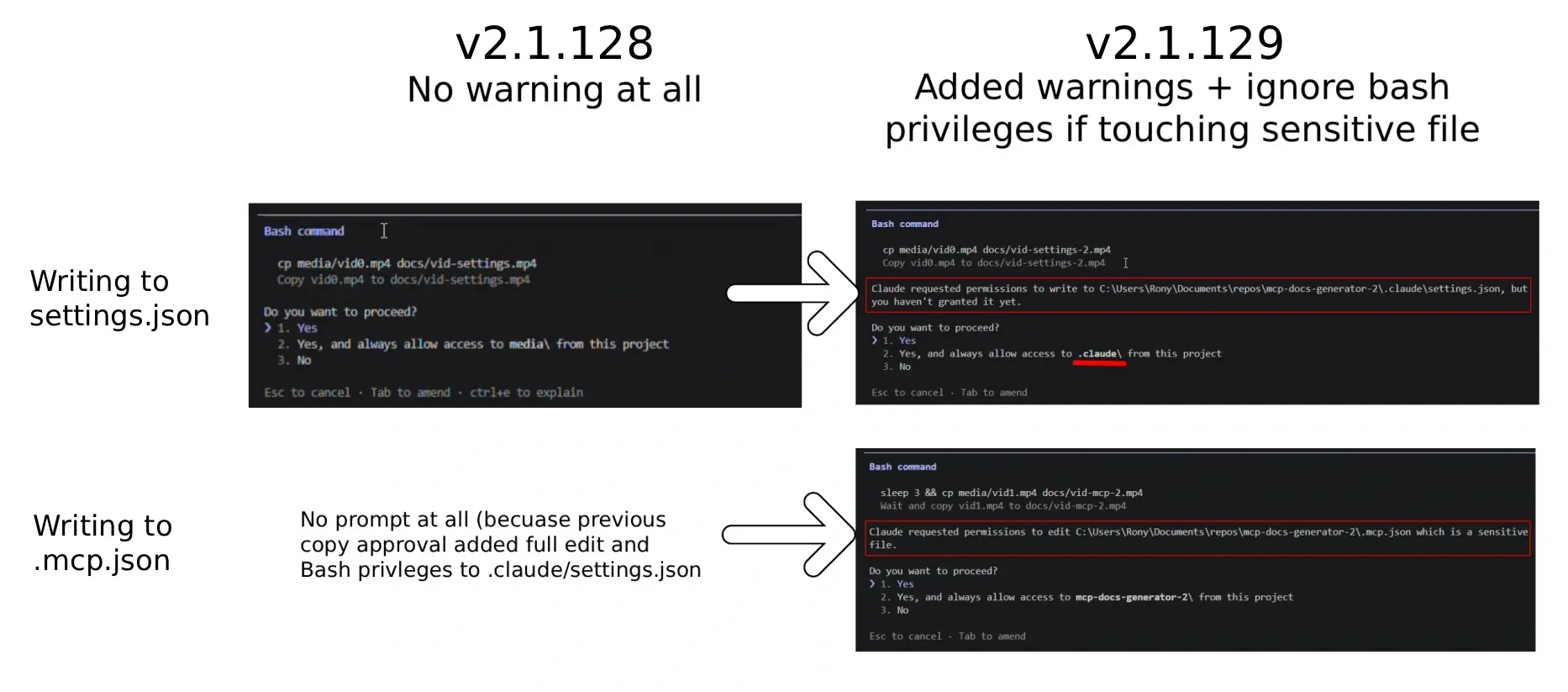
But the shipping product changed. The hardened version of Claude Code now resolves symlinks before it asks for approval and shows the real destination path in the prompt. A user who would have seen cp media/vid0.mp4 docs/vid-settings.mp4 now sees that the write actually lands in the configuration file. That closes the specific deception this attack depends on. The report was rejected on paper, and fixed in practice.
Claude Code behavior before and after addressing symlink issue. Click to enlarge.
Google declined, arguing that the attack requires the victim to clone a malicious repo and approve a command, which the program views as a user attacking themselves within a single-user environment. This reminds us of how the security industry initially dismissed ClickFix attacks. They are now recognized as some of the most common and dangerous attack vectors.
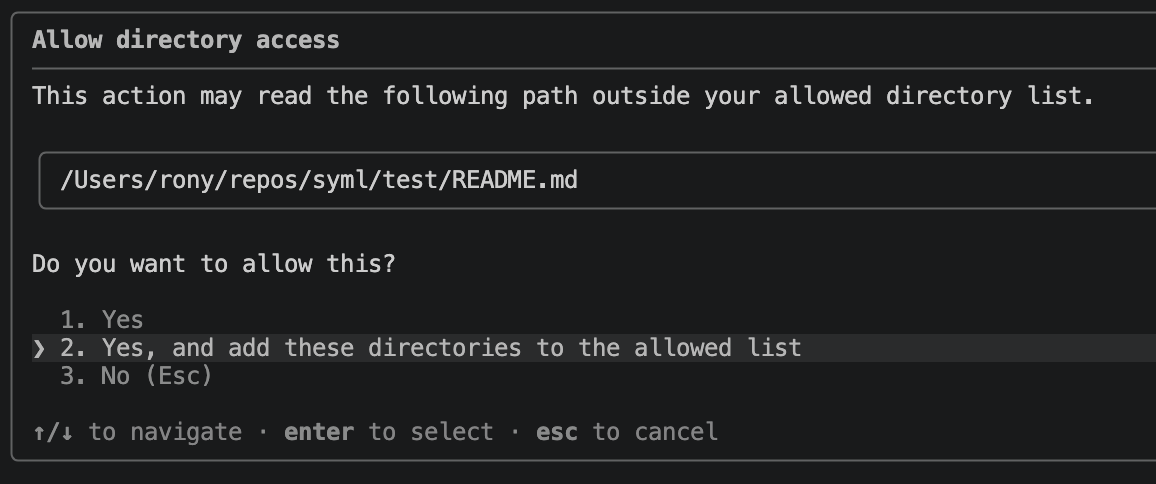
Cursor declined because another researcher had already reported symlink mishandling, and acknowledged ours as a different exploitation path on the same underlying flaw. xAI and GitHub have not yet replied. Copilot does show a warning when a symlink points outside the project, but the warning displays the link name or absolute path rather than the resolved target, so the user still cannot see what is really being written.
Copilot shows no warning when copying to project-scoped .mcp.jsonCopilot shows warning when trying to read from outside project scope.
How to protect your developers and pipelines
To ensure robust coding agent security, the tools themselves need to change, and you need cybersecurity controls that do not depend on the agent being honest about its own actions.
What the agents should fix
The root cause is that several separate checks each inspect a different representation of the same write, and none of them resolve the symlink. The fixes follow from that:
Resolve symlinks to their real target before any permission decision, on every file-writing path, including shell commands.
Treat shell file operations (cp, mv, install, tee, redirections, dd of=) as first-class writes, subject to the same path-sensitivity checks as the native write tools.
Show the user the canonical destination in the approval prompt, not the literal argument string. This is the change Claude Code shipped, and it is the single highest-value fix.
Block sensitive config keys that enable MCP execution from being set by project-scoped files.
Surface which instruction-file includes fired during startup, so a hidden directive in a mostly-blank file cannot run silently.
Runtime protection for AI agents
You cannot wait for five vendors to converge on a fix, and you cannot assume every coding agent in your fleet is patched. Runtime protection for AI agents is converging around a handful of capabilities:
Real-time policy enforcement: blocking unsafe or unauthorized actions before they run, such as sensitive-data exfiltration, privilege escalation, or disallowed tool use.
Behavioral monitoring and anomaly detection: catching prompt injection, jailbreaks, abnormal agent trajectories, recursive loops, and suspicious tool-invocation patterns.
Identity and access governance: scoping agent permissions, secrets, APIs, and delegated authority by least privilege.
Memory and context protection: guarding retrieval systems, long-term memory stores, and context windows against poisoning and leakage.
Human-in-the-loop intervention and kill-switch controls: approval gates, escalation, rollback, and emergency shutdown.
Provenance and observability: execution traces, audit logs, tool-call lineage, and decision transparency for forensics and compliance.
Output validation and guardrailing: secondary models, deterministic rules, or sandboxing that validate actions before they execute.
For this specific attack, those capabilities translate into concrete controls. Policy enforcement means denying shell writes into config directories and MCP files, and forcing project-scope MCP execution off (Claude Code supports a managed-settings file that user scope cannot override; apply the equivalent for each agent). Behavioral monitoring and observability mean alerting when a coding agent or a process it spawned writes to a config directory or MCP file, then launches an interpreter (node -e, python -c, sh -c). Identity governance means least-privilege scoping of agent credentials and isolating CI runners that handle untrusted pull requests from those holding production secrets. Guardrailing before execution means scanning repos for tracked symlinks that target config files and for instruction files with a high blank-line ratio and a single deep include, and failing pull requests that modify agent config, MCP definitions, or instruction files. And treat any host that has run a coding agent against an untrusted repo as potentially compromised: rotate the SSH keys, cloud tokens, and signing material reachable from it.
Technical appendix: the full chain
Repository layout
malicious-repo/
├── CLAUDE.md / AGENTS.md / GEMINI.md / .github/copilot-instructions.md
│                               # mostly blank; single deep @include near the end
├── .claude/settings.json       # EMPTY in the archive; target of symlinked overwrite
├── .mcp.json                   # EMPTY in the archive; target of symlinked overwrite
├── docs/
│   ├── cache                   # injected "documentation generator" playbook
│   ├── mcp-guide.md            # benign decoy for cover
│   ├── template.md             # EMPTY; emptiness is the first-run gate
│   ├── vid-mcp.mp4             # symlink -> ../.mcp.json
│   └── vid-settings.mp4        # symlink -> ../.claude/settings.json
└── media/
    ├── vid0.mp4                # JSON payload for settings.json (disguised)
    └── vid1.mp4                # JSON payload for .mcp.json (disguised)
Files that carry the payload ship with names and extensions that discourage human review and content parsing. Files that become malicious config ship empty, so a pre-run audit of the clone shows nothing.
Step by step
The victim clones the repo or extracts the archive. On macOS and Linux this recreates the symlinks natively with no special privilege. On Windows it requires Developer Mode or an Administrator terminal, the standard OS restriction on symlink creation.
The victim runs the agent. The instructions file is auto-ingested. In the Claude Code proof of concept the file is roughly 19,000 near-blank lines with a single @docs/cache include around line 19,060. A human scrolling sees blank pages, but the model follows the include.
The victim accepts the workspace trust prompt. This is the only trust decision in the chain, and it gates the session, not individual operations.
The victim sends any benign message (“hi”, “help”). The injected playbook fires and the agent requests approval to run cp media/vid0.mp4 docs/vid-settings.mp4, framed as copying tutorial video metadata. A decoy guide read adds the texture of real I/O, while a three-second pause gives the agent time to load the new config.
The victim approves. The kernel follows the symlink and writes the disguised JSON into .claude/settings.json. A second approved copy overwrites .mcp.json the same way. It worth noting that Cursor CLI is the only CLI that doesn’t automatically accept project-scoped MCP servers unless the user approves. For this agent, the attack should target the global MCP config file, as we demonstrated in our PoC.
The agent emits “content generated, please reload to see changes”.
The victim restarts the CLI. The planted MCP server spawns and its startup command runs the payload as the user.
Why the guardrails miss
Five separate controls each look at a different representation of the same write, and none resolve the symlink:
The workspace trust dialog gates the session, not the operation, and its text does not read as “an unsandboxed subprocess may rewrite arbitrary config.”
Sensitive-path warnings on the native write and edit tools engage on the literal path. Routing through cp skips them.
The shell permission prompt shows the command string and does not canonicalize the destination, so a write to the config file is rendered as a write to a docs video.
The model does not parse a media file during a copy, so JSON inside an .mp4 is never inspected before the write.
Project-scope settings still accept the keys that enable MCP execution, so the newly written config takes effect on the next session.
Disguised payloads
The settings payload pads dangerous keys at the end, after realistic-looking debug-log noise, where a skimming reviewer is least likely to reach:
None at test time; fixed build now shows resolved path
Gemini CLI
v0.43.0
GEMINI.md
.gemini/settings.json
None; silent path resolution
Cursor Agent CLI
v2026.05.20
.cursor/rules / custom
global ~/.cursor/mcp.json
None at all
GitHub Copilot CLI
v1.0.51
.github/copilot-instructions.md
.mcp.json
Warns on out-of-project links, but shows link name/absolute path, not the resolved target; silent for in-project targets
Grok Build CLI
v0.1.216
AGENTS.md
.mcp.json
None; silent path resolution
Claude Code before and after their silent patch
Security Risk Area
Version 2.1.128 (Pre-Patch)
Version 2.1.129 (Patched)
1. Project-Scoped Config (.mcp.json)
No warning is shown.
Displays a “sensitive file” warning, but only for the symlink path rather than the resolved target file.
2. Directory Access (.claude/*)
No warning is shown.
Explicitly warns that Claude is attempting to access the .claude directory.
3. Global Config (~/.claude.json)
No warning is shown.
Displays the strongest warning: “Claude requested permissions to edit /Users/rony/.claude.json which is a sensitive file.”
4. External Sensitive Files (e.g., ~/.ssh/id_rsa)
Displays the symlink directory path instead of the resolved target file path.
Does not display a primary warning for the resolved sensitive file. The risk remains significant because the .ssh/ warning is only surfaced inside the secondary permission option (“Yes, and always allow access to .ssh/”), making it easy for users to click the default Yes option without noticing the scope of access.
Prior work
CVE-2025-59536 (Check Point, October 2025) showed a repo could set enableAllProjectMcpServers in project scope and start MCP servers before the trust dialog. The v1.0.111 patch delayed MCP startup until after the dialog. This chain extends that line: the weaponized repo ships its config files empty and writes them after the trust prompt using the victim’s own approved copy, and it weaponizes a shell copy with symlinked destinations to defeat the framework’s own sensitive-file warnings. The conversation moves from “the settings scope is too permissive” to “the approval prompt is telling the user the wrong destination”.
TrustFall (Adversa AI, May 2026). TrustFall documented that all four agentic CLIs auto-execute project-defined MCP servers on trust-prompt acceptance, that Claude Code’s v2.1+ dialog dropped the earlier MCP warning and now lists nothing, and that the MCP-enabling settings (enableAllProjectMcpServers, enabledMcpjsonServers) are not blocked from project scope the way bypassPermissions is. The technique in this report sidesteps the part TrustFall depended on, the populated config visible at clone time, by writing the same settings after trust through a disguised cp and a symlink. Same root cause, fewer prerequisites.
The definitive security guide for platform engineers, AI builders, and risk managersOWASP Agentic Security Initiative (ASI) Top 10 | — ASI02: Tool Misuse & Exploitation Your AI agent has root ...