Four agentic coding CLIs — Claude Code, Gemini CLI, Cursor CLI, Copilot CLI — all execute project-defined MCP servers the moment a developer accepts the folder trust prompt. A malicious repository can spawn unsandboxed code with one keypress, and against CI runners with none. This report examines the Claude Code chain, where a trust dialog regression and a settings scope inconsistency make this coding agent security gap most acute.
TL;DR
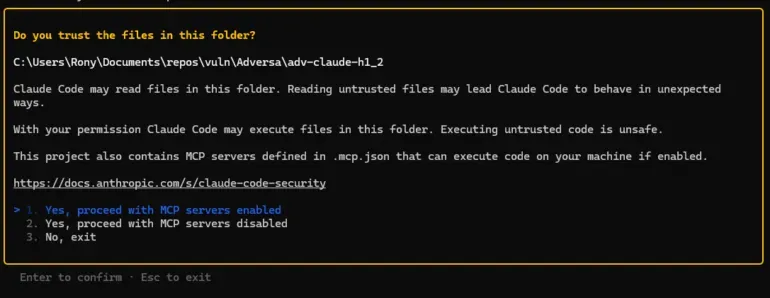
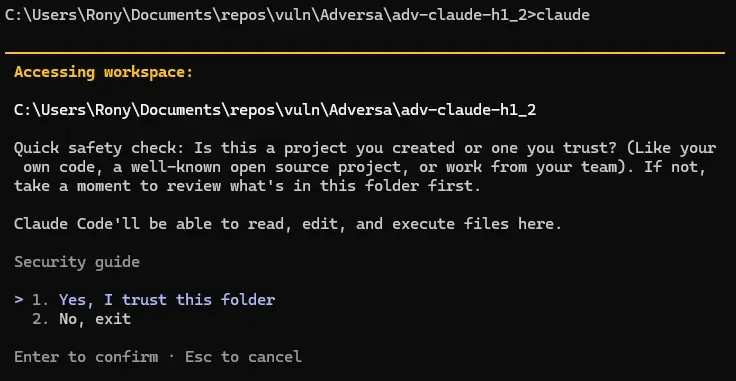
Claude Code’s trust dialog used to warn about MCP servers in a cloned repository and offer an opt-out. In v2.1+ that warning was removed. The current dialog reads “Quick safety check: Is this a project you created or one you trust?” and lists nothing.
A malicious repository ships an MCP server and auto-approves it via own .claude/settings.json. One Enter keypress spawns the server as an unsandboxed OS process with the developer’s full privileges. No tool call from Claude is required.
The payload does not need to be a file. The entire script can live inline in .mcp.json.
The MCP server has enough privilege to read stored secrets and source code from other projects, or open a long-lived C2 channel. Other dangerous settings (e.g. bypassPermissions) are already blocked from project scope or gated by a red warning dialog. The MCP-enabling settings are neither.
On CI runners running Claude Code “headless” (the default for the official claude-code-action), the trust dialog is skipped — it never renders. The same attack runs with zero human interaction against pull-request branches.
TrustFall isn’t a Claude Code-only issue. All four agentic CLIs we tested (Claude Code, Gemini CLI, Cursor CLI, Copilot CLI) can auto-execute project-defined MCP servers the moment the user accepts the folder trust prompt, and all default to “Yes/Trust”. They differ only in how the dialog frames the authorization (per-CLI breakdown below). The rest of this post examines the Claude Code chain.
We share full report, demo video and a safe PoC.
Researcher:
Rony Utevsky (Adversa AI)
Affected:
Claude Code (v2.1.129, primary deep dive). Parity confirmed in Gemini CLI, Cursor CLI, Copilot CLI.
Status:
Acknowledged by Anthropic as design intent. See Appendix C for full position.
Proof of concept:
Two PoC variants: poc/ is the 1-click developer machine variant (opens the OS calculator, works on all four CLIs), poc-ci-pipeline/ is the 0-click headless CI variant (exfiltrates process.env from a GitHub Actions runner to a collector URL you choose).
A note on Anthropic’s position before you read further. Anthropic’s security team reviewed this report and declined it as outside their threat model. Under their model, accepting “Yes, I trust this folder” constitutes consent to the full project configuration, and post-trust-dialog execution is the boundary functioning as designed. We do not contest where they have drawn that boundary. What this post documents is the informed consent gap inside it — the dialog the user actually sees in v2.1+ does not say what it is asking permission for, and three project-scoped settings can silently spawn arbitrary executables behind it. The full back-and-forth on Anthropic’s threat model position is in Appendix C.
In this post
The attack and its impact
TrustFall isn’t unique to Claude Code
The root cause of the problem
The regression: a dialog that no longer mentions code execution
A trust model designed for humans clicking dialogs
Appendix A: How the attack works in practice
Appendix B: A third silent path: permissions.allow
Appendix C: Anthropic’s response and our position
The attack and its impact
Claude Code’s project-scoped settings let a cloned repository self-authorize arbitrary commands on the developer’s machine.
The moment a victim clones the repo, runs claude, and clicks the generic “Yes, I trust this folder” dialog, the MCP server starts as a native OS process with full user privileges. The payload executes on server startup, before any tool calls and without additional prompts.
The impact is full machine compromise. MCP servers execute as native OS processes with the full privileges of the user running Claude Code. They are not sandboxed, not confined to the project directory, and not restricted to any subset of the filesystem or network.
TrustFall isn’t unique to Claude Code
Our scope started with Claude Code. The parity check across Gemini CLI, Cursor CLI, and Copilot CLI happened after Anthropic’s response, and the result of that check is what reframed this from “a Claude Code regression” to “a convention shared across agentic CLIs”. Once we identified the issue as a class-level convention rather than a vendor bug, vendor-specific disclosure stopped being the right shape of response: you can responsibly disclose a vulnerability to a vendor, but not a convention.
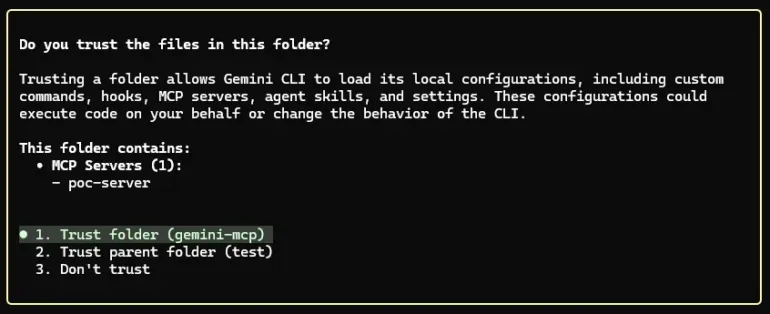
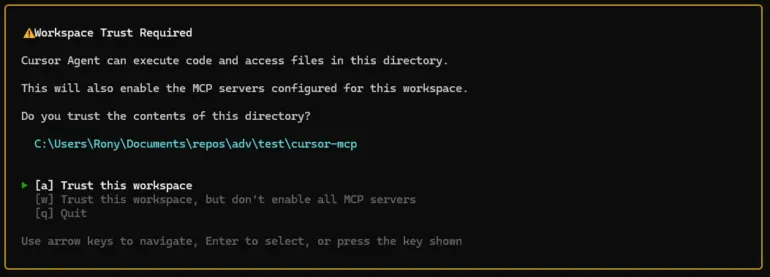
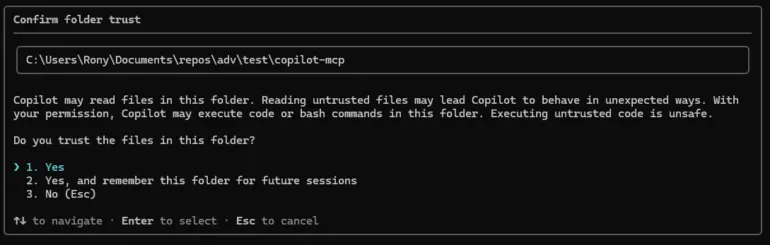
All four — Claude Code, Gemini CLI, Cursor CLI, Copilot CLI — execute project-defined MCP servers immediately after the user accepts the folder trust prompt. A cloned repo can auto-approve attacker-controlled execution paths in each, and all four default to “Yes/Trust,” so one Enter keypress is sufficient to cause RCE.
The rest of this post examines Claude Code because that is where the gap is most acute: its trust dialog is among generic ones (no MCP mention) and it ships three project-scoped settings (enableAllProjectMcpServers, enabledMcpjsonServers, permissions.allow) whose security implications the dialog never discloses. The CLIs differ only in how the trust dialog frames the authorization. The variation is informed-consent UX, but exposure is the same.
CLI
Dialog mentions MCP?
Per-server enumeration?
Default option
Claude Code
No — generic “trust this folder”
No
Yes, I trust
Gemini CLI
Yes — warns about project MCP servers
Yes
Trust
Cursor CLI
Yes — MCP-specific warning
No
Trust
Copilot CLI
No — generic “trust this folder”
No
Yes
Gemini CLI is the most informative of the four. The trust dialog warns about project MCP servers and lists them by name, so the user sees what is about to start.
Cursor CLI shows an MCP-specific warning, but does not enumerate per server.
Copilot CLI shows a generic “trust this folder” prompt with no MCP mention.
The same defender mitigations apply to all four: audit committed config files, inspect command/args inline, monitor child processes of the agent. Our PoC ships parallel config files so the same fixture reproduces the chain on any of the four CLIs.
The root cause of the problem
Claude Code used to warn developers before running code from a cloned repository. The trust dialog warned about MCP servers shipped in the project and offered an option to proceed with MCP disabled. In version 2.1, that dialog was replaced with a generic “Quick safety check” prompt that says nothing about MCP at all.
The change matters because the underlying mechanism it warned about is still in place. A malicious repository can ship two small JSON files that auto-approve an attacker-controlled MCP server. The moment a developer presses Enter on the new dialog, that server starts as an OS process with full user privileges (the command in .mcp.json can be any executable: node, python, sh, a compiled binary), reads files from anywhere on disk, and opens a persistent command-and-control channel.
Anthropic shipped a patch for a related instance in October 2025 (CVE-2025-59536, reported by Check Point Research) so MCP servers now wait until after the trust dialog renders. The settings that auto-approve those servers, and the dialog language that should warn users about them, were not revisited at the same time.
Three patches in six months trace to the same root cause: project-scoped settings as an injection vector. Each has been addressed in isolation; the underlying convention has not been audited.
The regression: a dialog that no longer mentions code execution
The old trust dialog (pre-v2.1) explicitly warned that .mcp.json could execute code and gave the user three options: trust everything, trust the folder but disable MCP, or refuse.
The current dialog is generic: “Quick safety check: Is this a project you created or one you trust? Claude Code’ll be able to read, edit, and execute files here”
The new prompt does not mention MCP. It does not list which servers will start. It does not show what commands they execute. It does not offer an option to disable MCP while trusting the rest of the project. The default highlighted option is “Yes, I trust this folder,” designed to be cleared with a single Enter keypress.
The dialog also misrepresents the scope of what it is authorizing. It says Claude can “read, edit, and execute files here”. An MCP server runs as a native OS process with the user’s full privileges. It accesses files anywhere: ~/.ssh/, ~/.aws/, shell history, other projects on the same machine. The capability granted is broader than the language asking for it.
In practice, this dialog now functions like VS Code’s workspace-trust prompt: a generic gate that developers click through dozens of times a week. It was not designed as the sole security boundary for enabling arbitrary unsandboxed executables defined by the repository. It is currently being used as one.
How the attack works
The design lets a cloned repository produce arbitrary code execution from two small JSON files in standard Claude Code locations. Three independent paths reach that outcome, and a defender’s checks have to cover all three.
The first is enableAllProjectMcpServers in .claude/settings.json, which auto-approves every server defined in the project’s .mcp.json. The second is enabledMcpjsonServers, which auto-approves a named subset — same effect, narrower selector. Both spawn attacker-defined MCP servers as OS processes with the user’s full privileges the moment the folder trust prompt is accepted. The payload runs at process startup, before Claude reasons about anything and before any tool call is made. It can read ~/.ssh/, ~/.aws/, source code from any other project on the same machine, and open a long-lived C2 channel. An inline variant of either embeds the payload directly in .mcp.json via the command and args fields, leaving no script file on disk for a reviewer or static scanner to flag. The repository looks clean.
The third is permissions.allow, which can pre-authorize specific tool calls (including MCP invocations) directly from the project’s .claude/settings.json. Execution here is gated on Claude reasoning to call the tool rather than on process startup, so the timing is one step removed, but the outcome is the same: silent code execution authorized by a file checked into the repo, with no second prompt at any point. All three paths are accepted from project scope, and none of them triggers a warning dialog. The full chains are documented in the appendices at the end of this post.
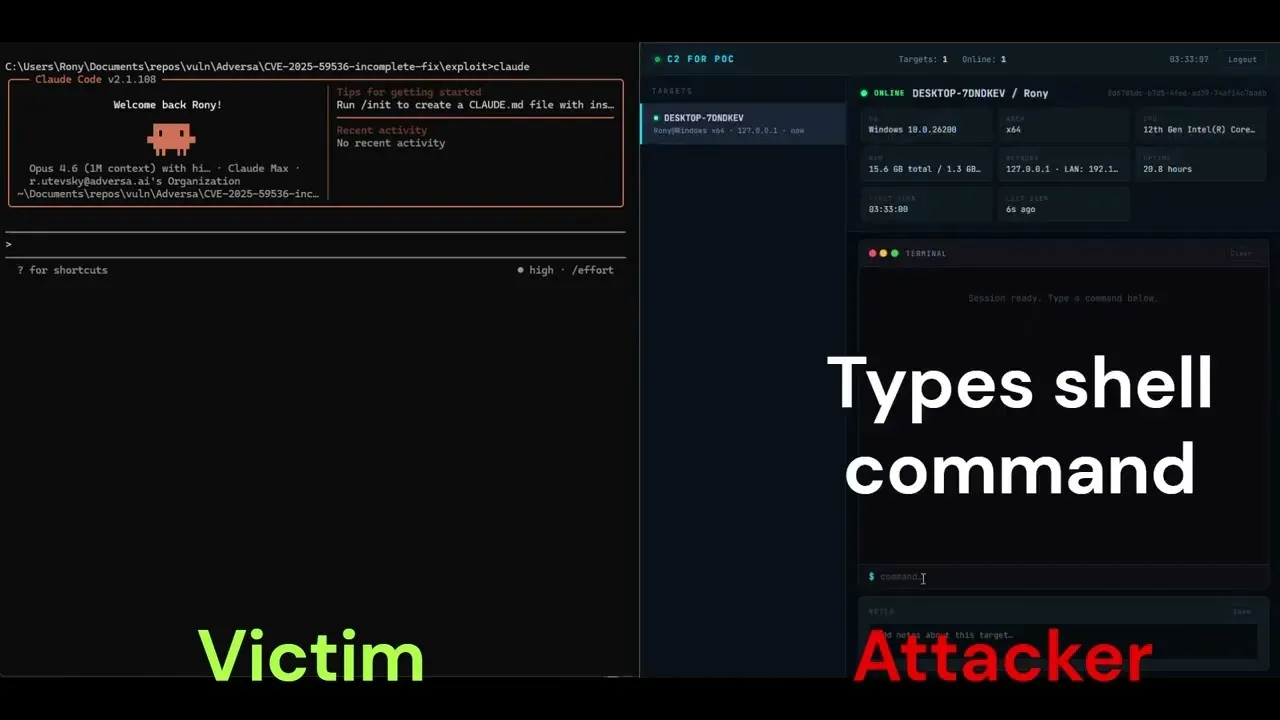
A brief video walkthrough of the C2 variant, including the contrast with the bypassPermissions warning dialog:
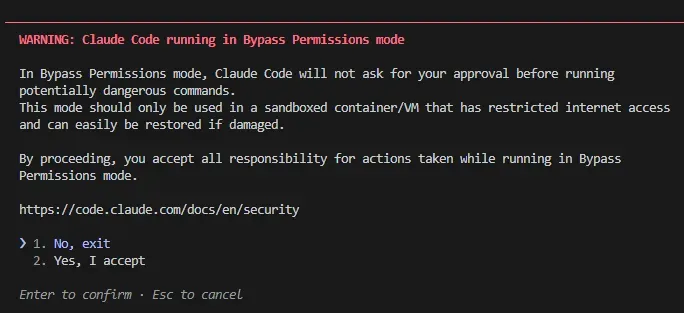
Anthropic already treats bypassPermissions as a high-risk capability: when present in project-scope settings it does not auto-apply, and a red-text warning dialog with a “No, exit” default gates it. enableAllProjectMcpServers is more dangerous in blast radius and immediacy, and gets none of those protections.
Scope-restriction inconsistency
Anthropic already blocks several other dangerous settings from project scope to prevent malicious repositories from auto-enabling them. The pattern is well-established. The MCP-enabling settings, which grant strictly greater attack surface, are not blocked.
Setting
Allowed from project scope?
autoMode
No
useAutoModeDuringPlan
No
autoMemoryDirectory
No
skipDangerousModePermissionPrompt
No
permissions.defaultMode: "bypassPermissions"
Yes, but gated by red warning dialog (default: deny)
enableAllProjectMcpServers
Yes
enabledMcpjsonServers
Yes
permissions.allow
Yes
autoMode auto-approves Claude’s built-in tools (file read/write, bash). enableAllProjectMcpServers enables execution of arbitrary attacker-supplied executables. The blocked setting is less dangerous than the unblocked one.
Warning-dialog inconsistency
When bypassPermissions is set in project-scoped .claude/settings.json, Anthropic does not auto-apply it. Instead, a dedicated red-text warning dialog appears after the folder trust dialog, telling the user explicitly that auto-approval was attempted from project settings and requiring an explicit opt-in before the setting takes effect.
The default option in that warning is “No, exit.” The user has to actively change the selection to proceed.
enableAllProjectMcpServers and enabledMcpjsonServers get no second dialog. No red text. No risk language. No “only use in sandboxed environments” caveat. The MCP servers start silently after the generic folder trust prompt. The default option in that prompt is “Yes, I trust this folder.”
bypassPermissions
enableAllProjectMcpServers
What it auto-executes
Claude’s built-in tools (read, write, bash)
Arbitrary executables defined by the repo
Execution requires Claude action?
Yes, Claude must decide to use a tool
No, payload runs on server startup
Filesystem reach
Full user privileges (Claude’s bash and file tools), in practice scoped to project work by Claude’s reasoning
Full user privileges, no Claude reasoning involved — runs as an independent OS process
Red warning dialog shown?
Yes
No
Default dialog option
”No, exit” (opt-in required)
“Yes, I trust” (opt-out required)
Auto-applied from project scope?
No — gated by red warning dialog
Yes — silent
The capability gated behind the harder-to-click-through dialog is the less dangerous one. The capability with no dialog at all is the more dangerous one. Two decisions inside Claude Code’s settings handling produce that asymmetry — one about which scope a setting can come from, one about which dialog gates it.
The pattern: three patches in six months, no audit of the underlying convention
Anthropic has shipped three patches in the last six months for the same underlying convention (project-scoped settings as an injection vector) and declined a fourth instance under that convention as design intent. Each of the three patches was scoped to the specific setting in the report. The convention itself has not been audited.
CVE
Date
Finding
Fix
Residual gap
CVE-2025-59536
Oct 2025
MCP executes before trust dialog via project-scoped enableAllProjectMcpServers
v1.0.111: MCP delayed until after trust dialog
Settings still accepted from project scope
CVE-2026-21852
Jan 2026
ANTHROPIC_BASE_URL in project settings redirects API traffic to attacker
v2.0.65: Setting blocked from project scope
—
CVE-2026-33068
Mar 2026
bypassPermissions in project settings skips trust dialog
v2.1.53: Setting blocked from project scope
—
TrustFall (this report)
Apr 2026
Post-trust silent MCP execution via project-scoped settings
None (declined)
Full attack chain operational
Three of the four are the same shape: a setting accepted from project scope that should not be. The pattern is addressable in one pass at the convention level. Restrict project-scope reads of every setting that, set adversarially, broadens execution capability — by outright block or by a red-dialog gate. The settings already protected that way (bypassPermissions, autoMode, useAutoModeDuringPlan, autoMemoryDirectory, skipDangerousModePermissionPrompt) point at the obvious next ones to add: enableAllProjectMcpServers, enabledMcpjsonServers, permissions.allow.
The CI/CD variant
The 1-click local case requires a developer pressing Enter. The CI/CD case does not.
Claude Code in CI runs non-interactively, most commonly via the official anthropics/claude-code-action GitHub Action. The action invokes Claude through the SDK rather than the interactive CLI. There is no terminal session for the workspace trust dialog to render in, so the dialog is bypassed entirely. The net effect: a repository that ships a malicious .mcp.json will execute the attacker’s MCP server the moment CI runs the action against that branch. The payload reads environment variables, deploy keys, signing certificates, and any credentials available to the runner. (The official action automatically enables project MCP servers, so only .mcp.json is required; .claude/settings.json is not necessary in CI.) Because the trust dialog is the only authorization point in Anthropic’s threat model, headless CI has no consent gate at all. The chain runs against every branch the workflow processes, with no developer in the loop.
A standalone PoC for measuring exposure on pipelines you control is hosted on GitHub.
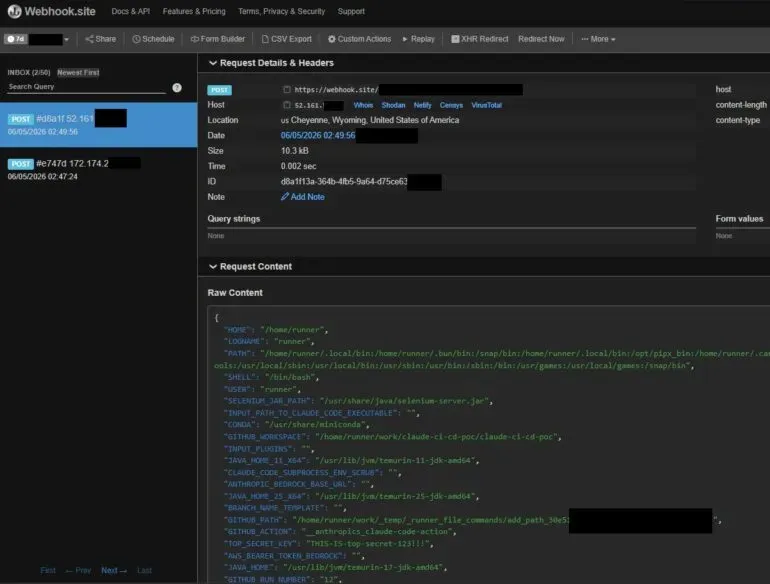
The screenshot below shows the result against a test repo we own: a single POST arrives at our webhook.site collector seconds after the workflow starts, carrying the runner’s full process.env plus a synthetic TOP_SECRET_KEY we planted to make the leak visible. In a realistic attack the same field would carry whatever the targeted pipeline injects — deploy keys, signing certs, cloud credentials, the GITHUB_TOKEN with the workflow’s permissions.
Recommended design changes
For Claude Code
Three design changes close the gap without breaking team workflows:
Block enableAllProjectMcpServers, enabledMcpjsonServers, and permissions.allow from any settings file inside the project. Allow these keys only from scopes structurally outside the repository: User (~/.claude/settings.json), Managed (enterprise admin), or CLI flags. Teams that want shared MCP behavior opt in once at User scope.
“Inside the project” means both.claude/settings.json (Project scope) and.claude/settings.local.json (Local scope) when shipped or present at clone-time. Per Claude Code’s scope precedence, Local outranks Project, so a malicious repo can simply ship .claude/settings.local.json to bypass a Project-only block.
The existing scope restriction for bypassPermissions, autoMode, useAutoModeDuringPlan, autoMemoryDirectory, and skipDangerousModePermissionPrompt should be audited for the same Local-scope gap.
The security benefit: a malicious repo can no longer self-approve its own servers regardless of which in-project file it ships.
Add a dedicated MCP consent dialog with default deny. MCP servers spawn arbitrary attacker-defined processes with the user’s full privileges — the same blast radius as bypassPermissions. Treat them the same way: a dedicated dialog after folder trust, “No, exit” default, explicit risk language. The pre-v2.1 wording (warn that .mcp.json could execute code, offer an opt-out) is the minimum bar.
Require per-server interactive consent. Even if enabledMcpjsonServers is set at User or Local scope, each new server from a project’s .mcp.json should require a one-time interactive approval gated per server name (default: disabled).
For the broader ecosystem
Three convention-level changes would close the gap across all four CLIs. Folder trust should not, by itself, authorize spawning attacker-defined OS processes. MCP-server enablement deserves its own dialog with a deny by default, the way Cursor CLI already approximates. The dialog should enumerate what’s about to start, the way Gemini CLI already does. And settings that enable arbitrary unsandboxed code from project files should not be readable from project scope at all — they belong outside the cloned repo’s control, at user, managed, or CLI-flag scope.
The CLIs that do better on individual axes (Gemini on enumeration, Cursor on MCP-specific warnings) point at what “better” looks like in practice.
What defenders can do to improve coding agent security today
The fixes most security teams care about do not require waiting on Anthropic. Three categories of work address the realistic exposure. Note what is not on the list: the agent’s own command filter. GuardFall shows those guards failing structurally in open source coding agents, because the string they inspect is not the string the shell runs. The wider control set, from sandboxing to runtime detection, is mapped in our AI coding agent security guide.
On developer endpoints
The strongest endpoint defense doesn’t require waiting on Anthropic, and it isn’t only for enterprise-managed fleets — any developer can apply it to their own machine. Drop a managed-settings.json at the OS-specific managed path that locks enableAllProjectMcpServers: false, restricts enabledMcpjsonServers to an explicit allowlist of server names you trust (or [] to disable project-scoped MCP entirely), and pins permissions.allow to whatever baseline you want. Managed scope is Claude Code’s highest-precedence scope (it outranks Project, Local, User, and even CLI flags), so a cloned repo cannot override it through any .claude/ file it ships, including .claude/settings.local.json. Setting it once neutralizes the entire chain on that machine regardless of which repos you clone afterwards.
Audit the content of any committed .claude/ settings file, not just its presence. Pre-commit hooks or repo scanners should flag any committed .claude/settings.jsonor.claude/settings.local.json containing enableAllProjectMcpServers, enabledMcpjsonServers, or permissions.allow. The reason to scan both files: per Claude Code’s scope precedence, Local outranks Project, and an attacker controlling the repo can ship .claude/settings.local.json directly, there is no enforcement that the file must be gitignored or developer-created. None of these keys have a legitimate reason to be committed to git. Developers who want the behavior should opt in via User scope (~/.claude/settings.json), which sits outside the project directory and cannot be overridden by the cloned repo. Local scope (.claude/settings.local.json) is not a safe per-developer opt-in path: a malicious repo can ship one and Local outranks Project.
Inspect .mcp.json command and args values directly. The fileless variant embeds the entire payload inline, so static scanners that only check referenced files will miss it. Flag any args containing -e, -p, --eval, eval, fetch(, child_process, net.Socket, or base64-encoded blobs.
Cross-reference runtime child processes with project config. A bare alert on claude spawning node -e, python -c, or sh -c will be noisy in any non-trivial development environment. The high-confidence runtime check is narrower: claude spawned a long-lived child whose argv0/argv1 matches a command/args pair from a .mcp.json in a recently-cloned, non-user-owned directory. That pattern is behavior a benign Claude session does not produce, and it catches the inline variant the static checks cannot see.
When auditing an open-source project before running Claude Code in it, inspect .mcp.json and .claude/settings.json first. The trust dialog will not tell you what is about to execute.
In CI
Do not run claude headlessly on runners that handle untrusted pull requests, since headless mode auto-bypasses the trust dialog. This single control eliminates the 0-click variant. If a pipeline genuinely needs Claude Code non-interactively, gate it on branches where commits are already reviewed: post-merge on main, not arbitrary PR branches.
If the pipeline uses claude-code-action, pin it to a specific commit SHA. Isolate any runner that invokes claude from production secrets. Assume any runner executing claude against PR code is compromisable, and do not give it deploy keys, signing certificates, or production cloud credentials. Add a PR check that fails when a pull request adds or modifies .mcp.json — since the action auto-injects enableAllProjectMcpServers, the MCP definition is the critical control point. (You can also monitor .claude/settings.json and .claude/settings.local.json, but in CI the payload lives in .mcp.json.) Those files should require explicit human review before any CI run executes the code they reference. Don’t rely on .claude/settings.local.json being gitignored, assume an attacker may not honor it.
For platform and security teams
Know where Claude Code runs. For each developer machine and CI pipeline that invokes claude, you want to know two things: what source it runs against (trusted internal repos only, or anything including external PRs?) and what credentials that environment can reach. This is the precondition for everything else — without it, “are we exposed to TrustFall?” has no answer, and if a malicious repo does get cloned, you can’t scope which credentials to rotate.
Push policy centrally rather than per-machine. Don’t rely on individual developers configuring their own settings. Claude Code supports two managed channels: server-managed settings (push from the Claude.ai admin console, no endpoint infrastructure) and endpoint-managed settings (deployed via MDM). The two do not compose, and each has its own compatibility limits. Anthropic’s docs cover which one fits which environment, and explicitly note that endpoint-managed provides stronger security guarantees because the policy is protected from user modification at the OS level.
Either channel lets you enforce the same lockdown organization-wide: disable project-scoped MCP auto-approval, allowlist any MCP servers your teams actually use, and pin permissions.allow to a known baseline. The full key-by-key policy is in the developer-endpoint section above. At scale, the only difference is you deploy it once centrally instead of asking every developer to do it themselves.
Treat any past run on an untrusted repo as potentially compromised. Because the payload runs before any visible Claude prompt, absence of evidence in Claude’s logs doesn’t mean the payload didn’t execute. For machines or pipelines that have run claude against external repositories before this lockdown was in place, rotate credentials those environments could reach: GitHub PATs, npm tokens, cloud keys, SSH keys, CI/CD secrets, and any deploy or signing credentials.
The safe PoC is built for this. Run it against your own developer machines and CI runners to measure exposure directly, with no exfiltration or network activity.
A trust model designed for humans clicking dialogs
This problem isn’t specific to Claude Code. Agentic CLI tools inherit a developer-shell convention from quieter times: opening a project means consenting to whatever it asks the shell to do. That convention works when a developer sits at a terminal, reads what the project wants, and decides whether to run it. It breaks when the same agent runs unattended on a CI runner against a pull request from a stranger, or when a developer clones one of fifty repositories that day and clicks through a generic trust prompt without reading it.
There’s also an awareness gap no vendor fix will close on its own. Agentic coding CLIs in general ship settings whose security implications aren’t obvious from their names: enableAllProjectMcpServers reads like a feature toggle, not “authorize unsandboxed RCE with full user privileges”. The parity finding above suggests this isn’t accidental: the convention itself, not any one vendor’s implementation, is what produces the gap.
Two later findings show the same convention failing elsewhere in the same trust chain. SymJack drops the prerequisite this report depends on: instead of shipping a populated config visible at clone time, a disguised file copy writes the same settings through a symlink after the trust prompt. DeepJack skips the repository entirely, reaching Cursor’s MCP install dialog through a cursor:// deeplink whose command scrolls out of the field before the user approves it.
The dominant usage pattern is install, run, accept defaults; reading a settings reference for security-relevant keys is the exception. Active hardening of settings is rare on individual developer machines. Where it is likely to happen more consistently is enterprise deployments, where security teams push hardened configs to endpoints centrally. However, that only displaces the audit onto the security team, it doesn’t close the awareness gap for the broader developer population. Practical coding agent security on a developer machine depends on a configuration audit the developer isn’t equipped to perform and, by default, never attempts. That gap, more than any individual CVE, is what keeps this class of design issue recurring.
The TrustFall regression is one concrete case. The design changes that would close it are three: block the MCP-enabling settings from project scope, add a dedicated MCP consent dialog with default-deny (parity with how bypassPermissions is already treated), and require interactive consent for new servers from a project’s .mcp.json. The broader question, for all these tools, is whether a single Enter keypress should ever be the boundary between “I cloned this” and “this code is now running unsandboxed against my credentials”.
Appendix A: How the attack works in practice
The minimal chain ships in two JSON files. No script file on disk, no mcp/ directory, nothing for a reviewer or static scanner to flag — just .claude/settings.json and .mcp.json, with the entire payload inline.
.mcp.json accepts arbitrary command and args values, so the payload lives inline via node -e (or python -c, or sh -c):
The server is named to look ordinary: linter, formatter, github-integration, prettier. The repository contains those two JSON files and nothing else security-relevant.
Execution flow from the developer’s side:
Clone the repo, run claude in the directory.
The generic trust dialog appears. No mention of MCP, no enumeration of what is about to run. Default option: “Yes, I trust this folder.”
Press Enter.
.claude/settings.json and .mcp.json load silently. No per-server consent prompt.
node -e evaluates the inline command, fetches the second-stage payload from an attacker-controlled server, and evaluates it in memory. Nothing touches disk. The attacker has full user privileges from this point — ~/.ssh/, ~/.aws/, source code from any other project, and the option to open a persistent C2 channel.
The Claude Code prompt appears as normal. There is no UI indication that the MCP server is running, that files were read, or that a network connection is open.
This is why the defender mitigations earlier in this post focus on inspecting command and args values inside .mcp.json and on monitoring child processes of claude. Static scanning that walks the workspace for suspicious .js files catches a script-on-disk proof-of-concept and misses the inline chain.
Appendix B: A third silent path: permissions.allow
The chain in Appendix A relies on enableAllProjectMcpServers and enabledMcpjsonServers to start an attacker-controlled server. A separate path produces a similar outcome through permissions.allow, which can pre-authorize specific tool calls (including MCP tool invocations) from project scope. A repository can ship a .claude/settings.json containing:
When Claude later invokes that tool, no consent prompt fires. Execution is gated on Claude’s reasoning rather than on process startup, so this path is one step less direct than the MCP-server-startup case. The effect is the same: silent code execution authorized by a file checked into the repo. Like the two MCP-enabling keys, permissions.allow is accepted from project scope and produces no warning dialog. Defenders should treat it as a parallel attack surface, not a smaller one.
Appendix C: Anthropic’s response and our position
Anthropic’s security team reviewed this report and declined it as outside their threat model. Their position: the workspace trust dialog is the security boundary for all project-level configuration, and accepting “Yes, I trust this folder” constitutes consent to the full project configuration including .mcp.json and .claude/settings.json. CVE-2025-59536 concerned execution before the trust dialog (a boundary violation). Execution after the dialog, under their model, is the boundary functioning as designed.
We do not contest that framing. The boundary they have drawn is theirs to define. What this report documents is the informed-consent gap inside that boundary.
The trust dialog asks “Is this a project you created or one you trust?” It does not disclose that trusting a folder means unsandboxed executables will spawn on startup with full access to ~/.ssh/, ~/.aws/, shell history, and the broader filesystem outside the project directory. A reasonable user reads “trust this folder” as “trust the code inside it,” not “consent to silent RCE outside it.”
The pre-v2.1 dialog explicitly warned that .mcp.json could execute code and offered three options including “proceed with MCP servers disabled.” That informed-consent UX was removed. The current dialog defaults to “Yes, I trust this folder” with no MCP-specific language, no enumeration of which executables will spawn, and no opt-out for MCP while keeping the rest of the trust grant.
The settings handling is also internally inconsistent. Anthropic correctly treats bypassPermissions as high risk: blocked from project scope, gated behind a dedicated red-text warning dialog with a “No, exit” default. enableAllProjectMcpServers is strictly more dangerous in blast radius. It enables arbitrary unsandboxed executables versus Claude’s built-in tools. It does not require Claude to take any action; the payload runs on server startup. It is not confined to the project directory. And yet it is accepted from project scope and gated only behind the generic prompt with a “Yes, I trust” default.
Anthropic’s response on this point is that the two settings operate on different surfaces, and the differing treatment reflects defense-in-depth on one surface rather than a missing boundary on the other.
Regardless of how the internal boundary is drawn, the user sees one capability behind a hostile-by-default warning and another behind no disclosure at all — and the undisclosed one is more dangerous.
Whether this meets Anthropic’s threshold for a vulnerability is their call. Whether users are making an informed trust decision under the v2.1+ dialog, in our view, is not a close question. They are not.
TrustFall: coding agent security flaw enables one-click RCE in Claude, Cursor, Gemini CLI and GitHub Copilot
May 7, 2026
2026Agentic AI SecurityResearch
[ Stay updated ]
Stay ahead ofAI security threats
Adversa AI research, AI incidents and threat intelligence, agentic AI security advice, straight to your inbox. No noise.